Sketch to Render: A House Sketch, Start to Finish
By Inkfinish · · 8 min read
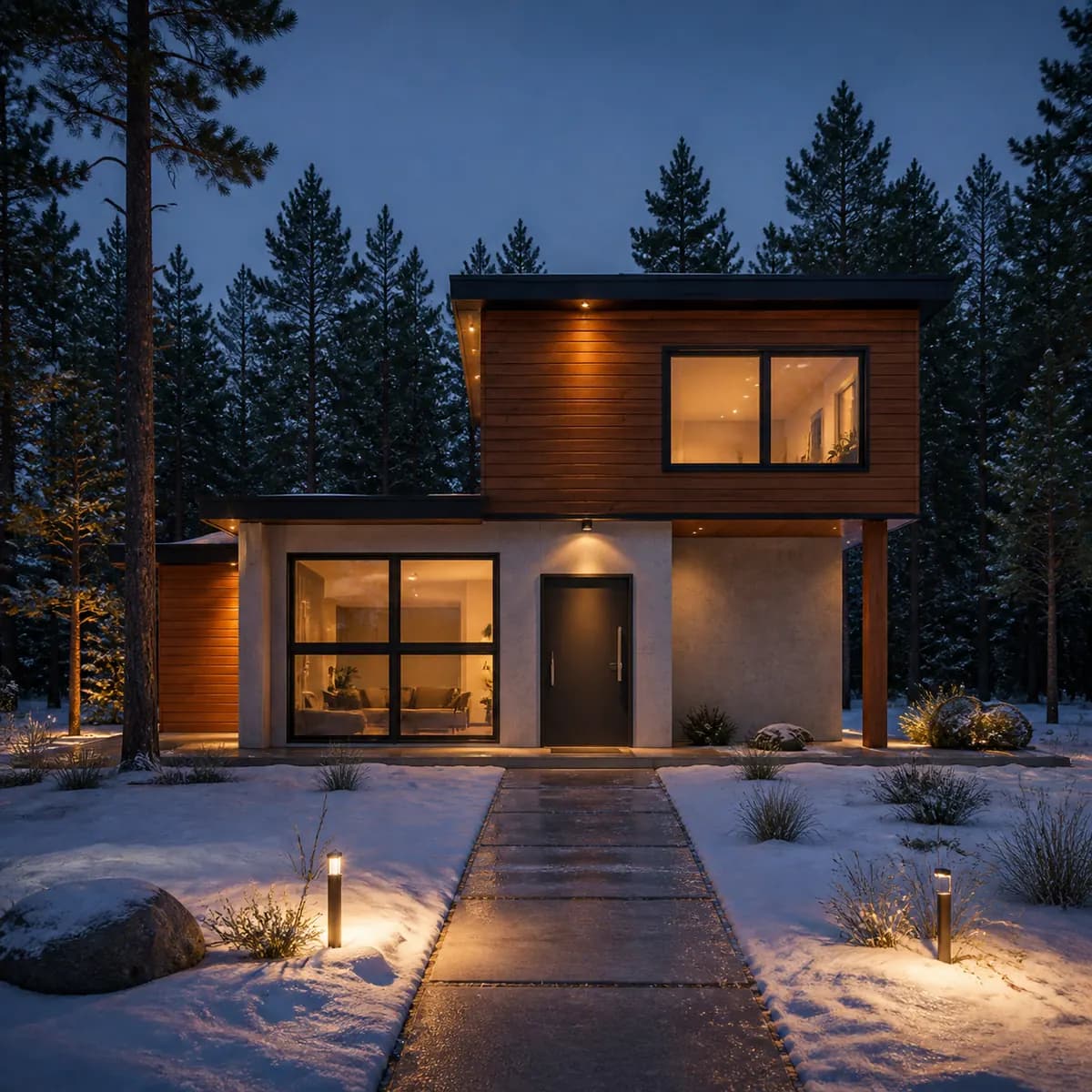
This is one house sketch taken all the way through Inkfinish: the drawing, the words typed, the render that came back about 30 seconds later, the line check that shows what was kept, a second and very different version from the same drawing, and the free download with its watermark. If you want to see what house sketch to render looks like in practice, with nothing tidied up, this is it. Every prompt is quoted word for word, including one that contradicted itself.
The sketch is a studio sample, so you can repeat each step. For the wider picture of AI rendering from a hand sketch, see the practical guide to sketch to render with AI.
The sketch
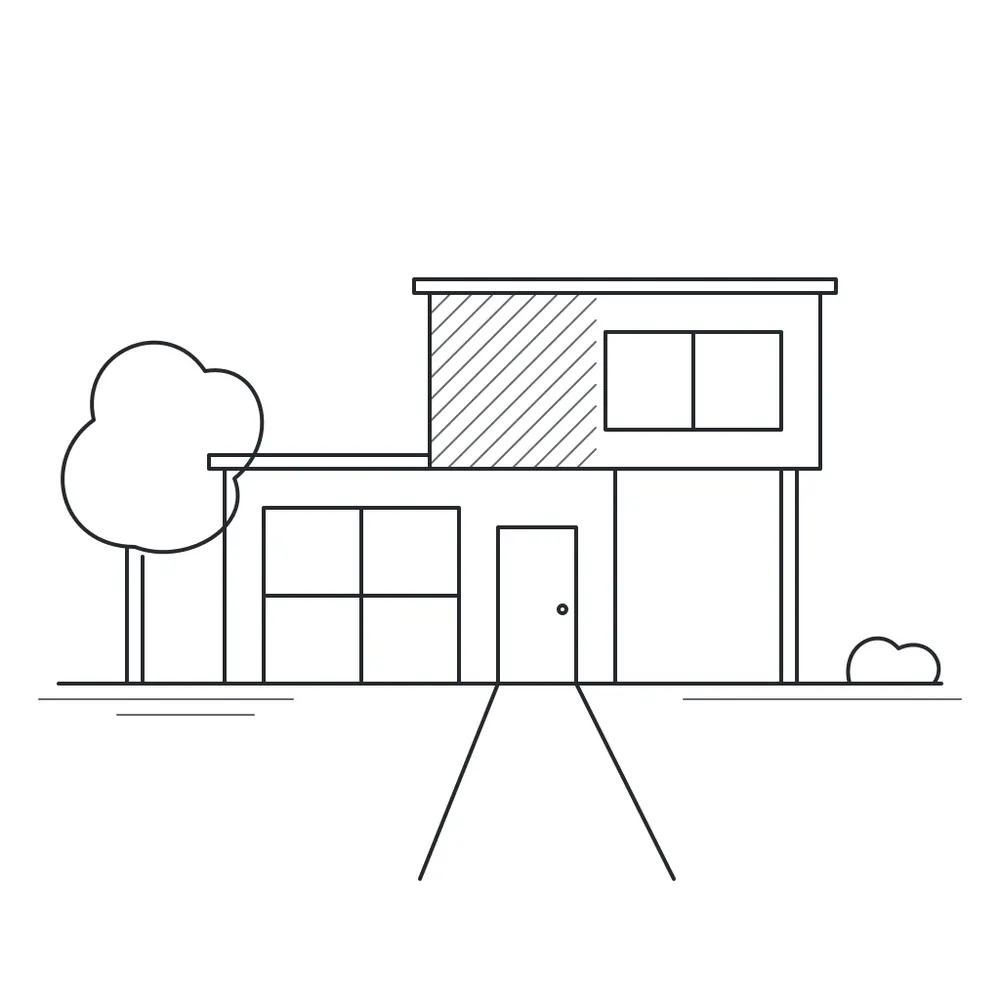
The drawing is simple on purpose. A two-story house seen from the front, flat roofs on both volumes, and an upper block that reaches out over a post on the right. A four-pane window and a door on the ground floor, a two-pane window upstairs, a path running toward the viewer. Part of the upper block is hatched, which in a hand sketch means "a different material here" without saying which. A round tree stands on the left, a low shrub on the right.
No shading, no materials, no sky: shape is in the lines, and finish will come from the description. From paper, a straight-on phone photo in even light is enough. The first step of the tutorial shows the other inputs the studio takes, including a 3D-model screenshot (see rendering a model screenshot without a plugin).
The description, and why "Building exterior"
Here is the description, word for word:
Cedar cladding and pale concrete, large glass, late afternoon sun, pine forest behind, night, lights on inside, snow on the ground
The sample's own description ends at "pine forest behind". The rest came from the idea chips under the description box: a chip adds its phrase to the end of the description, so clicking "Night, lights on inside" and then "Snow on the ground" produced the line above. We will come back to what that did to the light.
The subject was left on "Choose for me", and the studio picked Building exterior from the drawing. The subject sets the light and camera habits a render starts from. For exteriors: verticals kept straight, as a shift lens would; believable materials at the right scale, with some weathering; real reflections in the glass; planting and paving on the site; and, unless you say otherwise, natural daylight with soft, directional shadows.
Notice what the description leaves out: nothing about two stories, flat roofs, the overhang or where the door is. The drawing already says all of that. The words only cover materials, light and setting. How to write a render prompt goes through that vocabulary subject by subject.
From house sketch to render in about 30 seconds
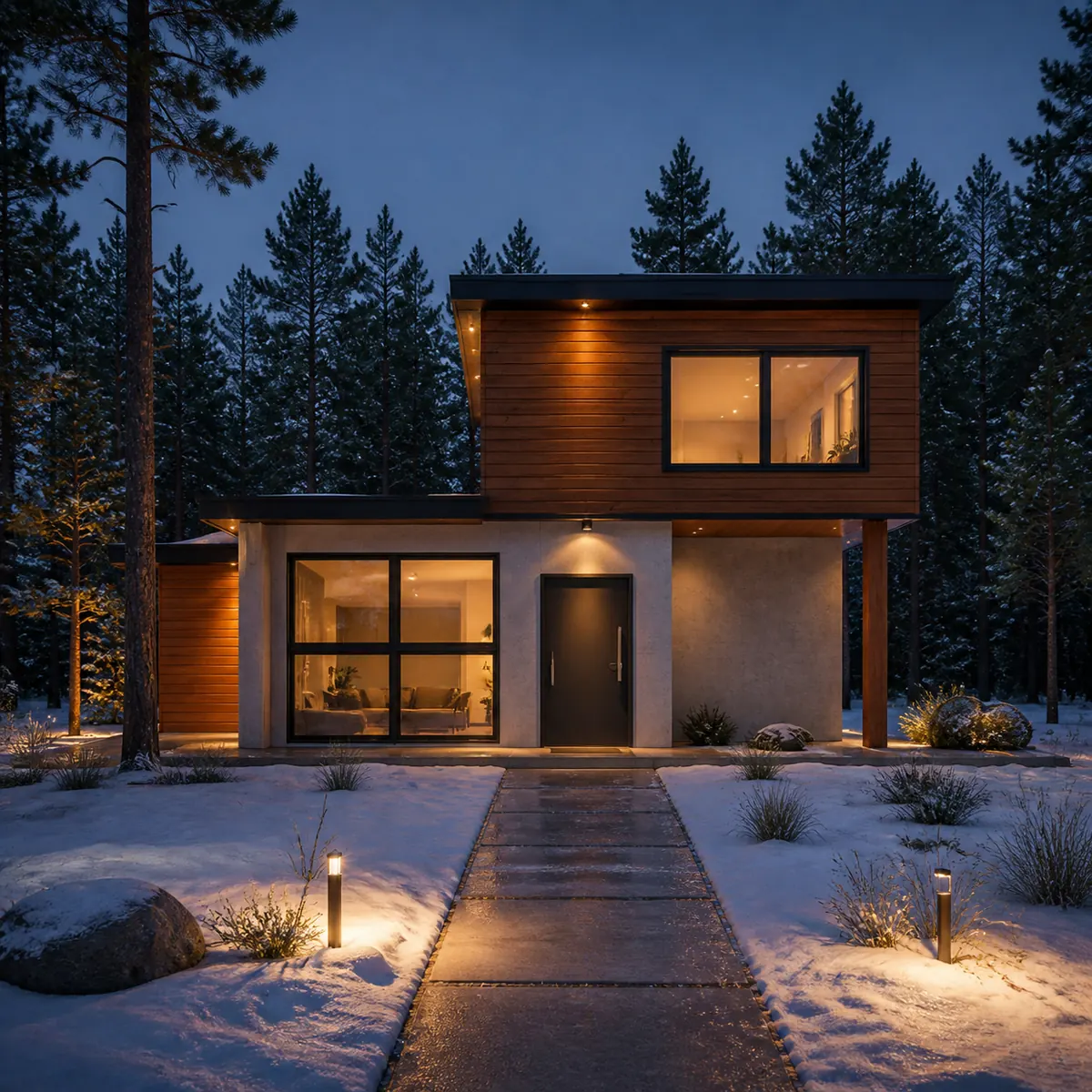
The upper block is clad in horizontal cedar boards, the ground floor is pale concrete, the windows glow, and the house sits in snow with pines behind. The door, both windows, the overhang and its post, and the path are where the sketch put them. In the studio, a drag handle compares it with the drawing.
Now the light. The description asked for "late afternoon sun" and, two phrases later, "night". Both cannot be true, and the model chose night. When two words disagree, you do not get to decide which wins. The lesson: one time of day per description. After clicking an idea chip, read the whole description and delete whatever the chip now contradicts. For this night version, "late afternoon sun" should have gone.
To see what light alone does, run the sample three times, swapping "late afternoon sun" for "golden hour light", "overcast, soft light" and "night, lights on inside".
Two things changed that the sketch did not ask for. The round tree became a tall pine, which "pine forest behind" invited. And a short cedar-clad wing appears behind that tree, left of the ground-floor wall, where the drawing has only the tree. Keep that wing in mind.
The line check: 82%, and what the red lines were
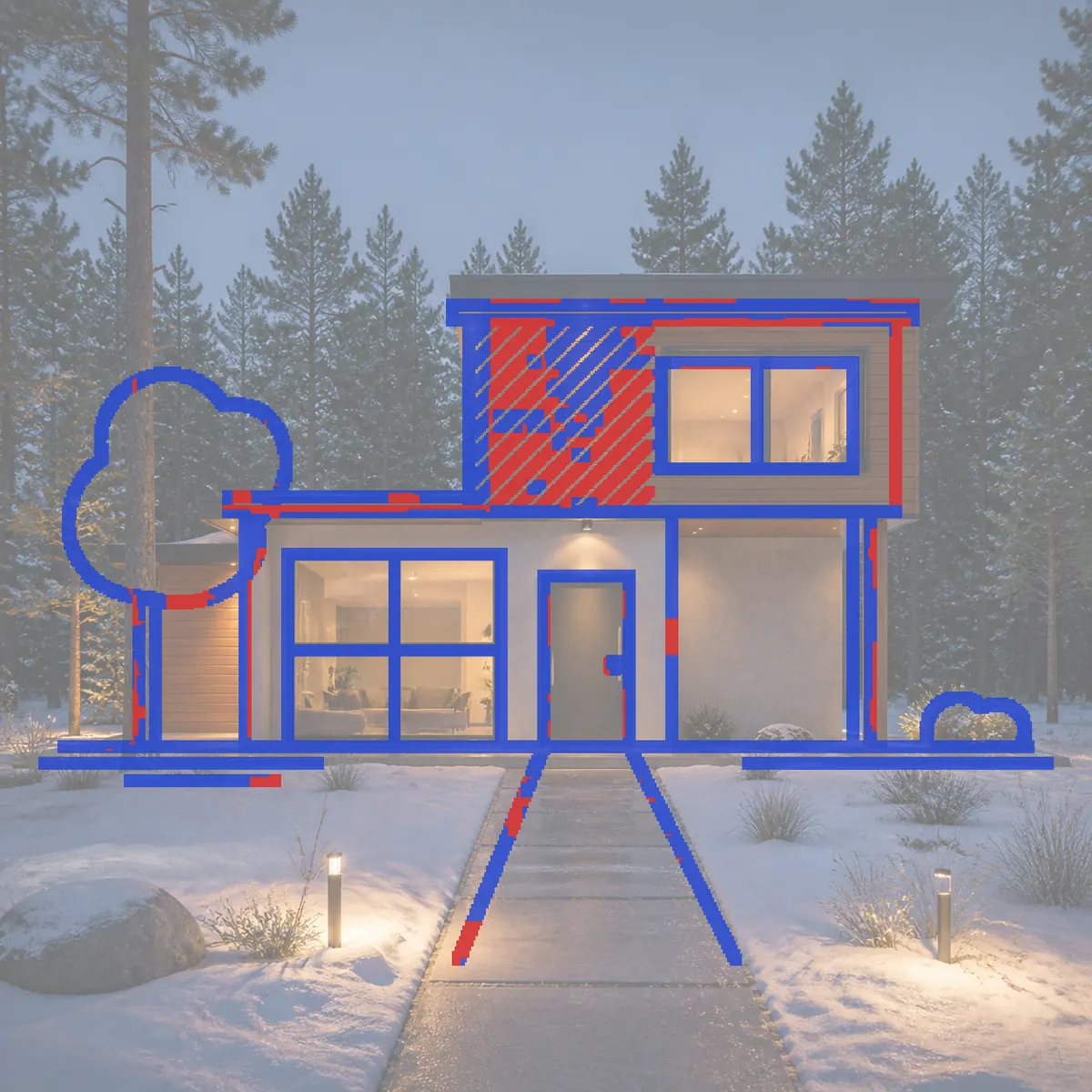
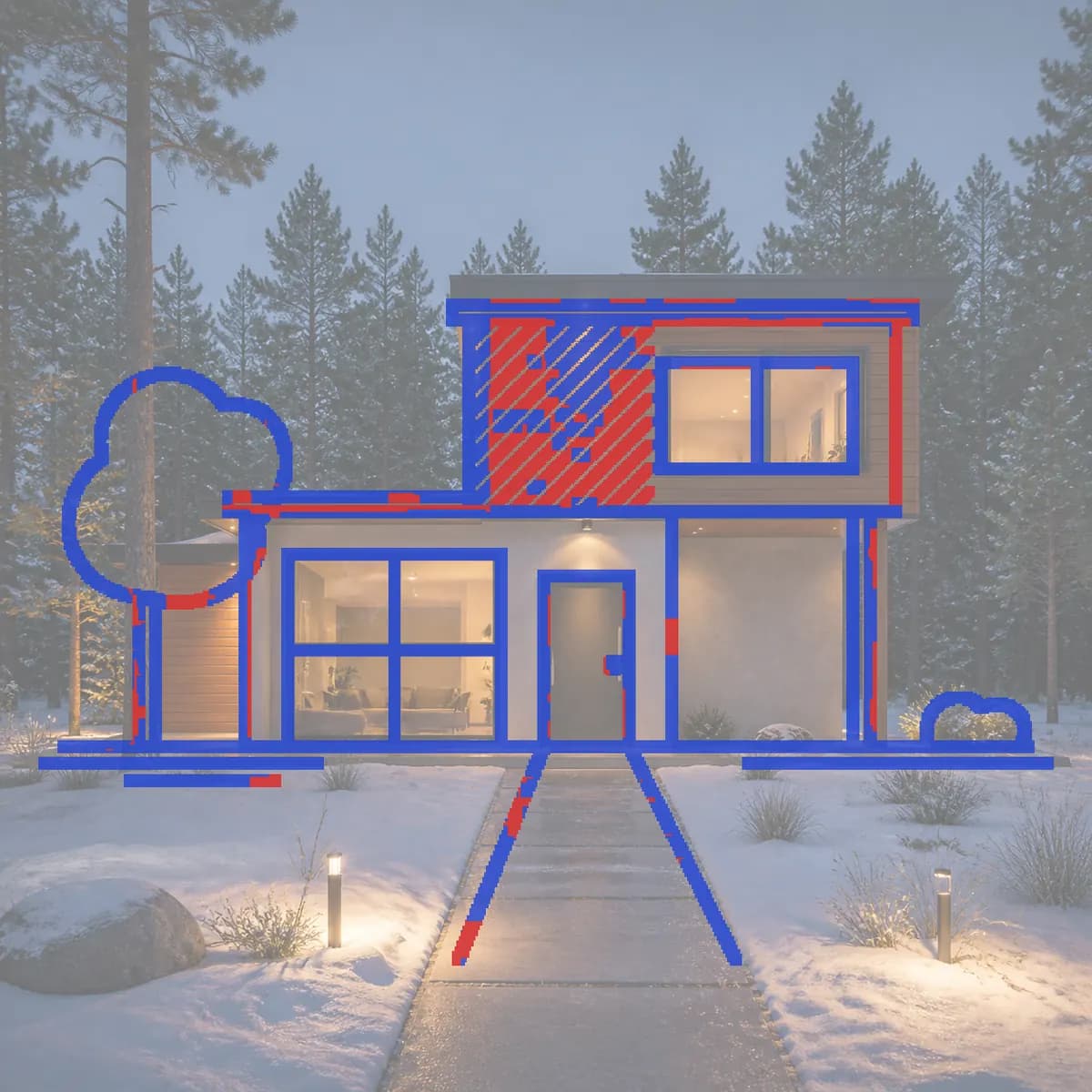
Under every render made from a sketch, a line check reports how much of the drawing's linework the render kept. This one read "82% of your lines kept", with a note to check the red ones. Scores from 45% to 84% get that note; 85% and above get no warning. "Show lines" draws the overlay: the render faded back, the sketch on top, blue where the render has a line in the same place and red where it does not.
Read it like a markup. The roof slabs, the overhang, the post, the door, both windows with their mullions, the ground line and the path are blue. Most of the red sits inside the hatched block. That is not a lost piece of the design: the hatching meant "a different material", the render answered with cedar boards, and horizontal boards do not draw diagonal lines. A few short red segments run along the top roof edge, the left wall and the tree.
So 82% here means the house is the drawn house, and most of the missing 18% is hatching. The number alone cannot tell you that; the overlay can.
The check also works in one direction only. It asks whether each sketch line survived, not whether the render added something, so the cedar wing does not show up in red. Look at the render as well as the overlay. Does AI rendering keep your design? explains how the score works and where it can mislead.
A second version: same sketch, different everything
Every render is a version, and nothing is overwritten. A follow-up message in the same design renders the same drawing with your new words, while the first version stays above it in the thread.
For the second version we wrote something as far from the first as we could:
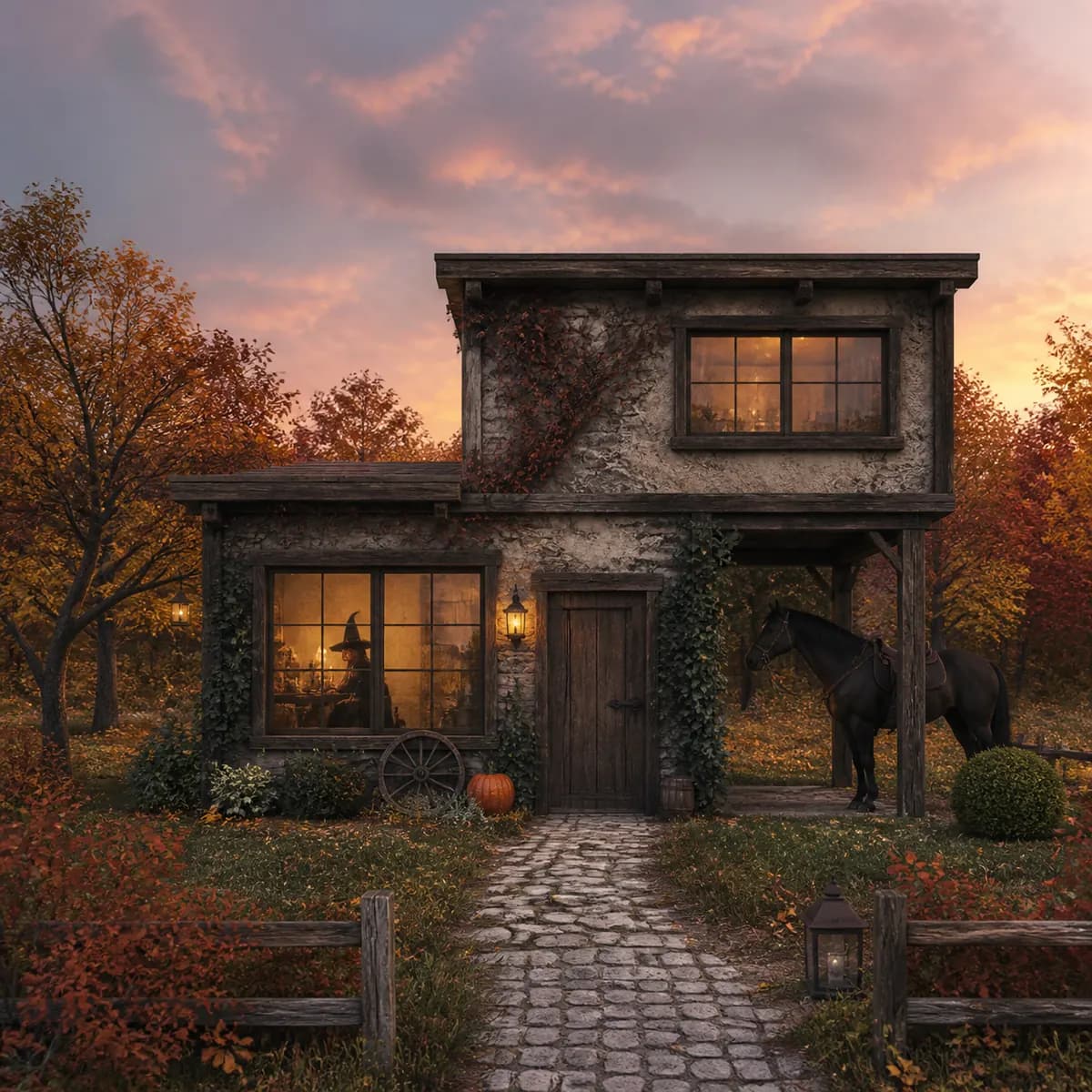
Medieval, cottage, with fall foliage in the background. With a horse. Also a pumpkin. With a cute witch inside. Dusk.
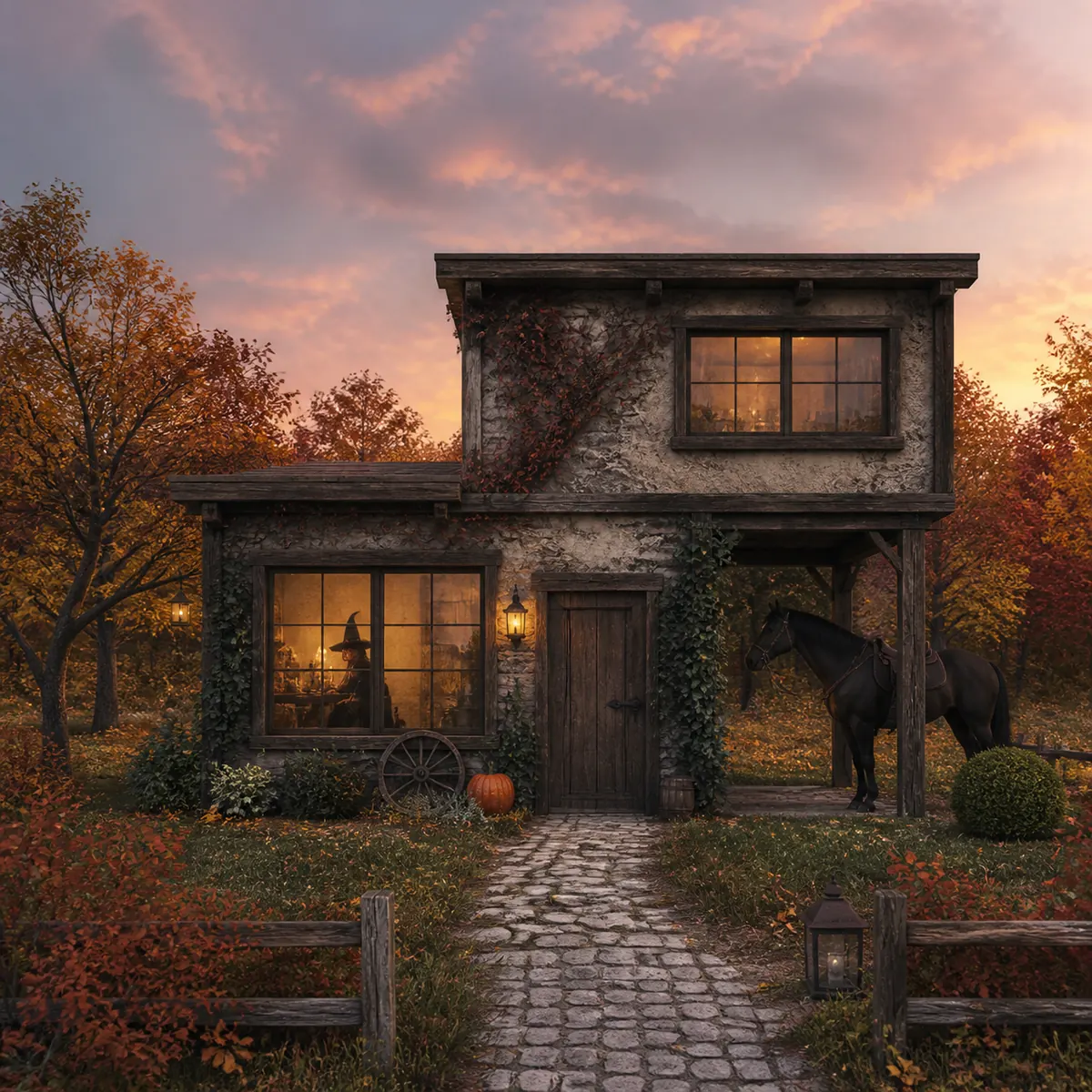
The modern house became a rough stone-and-plaster cottage with timber beams, a plank door, small-paned windows, ivy and lanterns under a pink dusk sky. The horse stands in the open bay under the overhang, the one place in the drawing with room for it. A pumpkin sits by the door, and a figure in a pointed hat sits at the lit window. There is one light word this time, "Dusk", and the light is consistent.
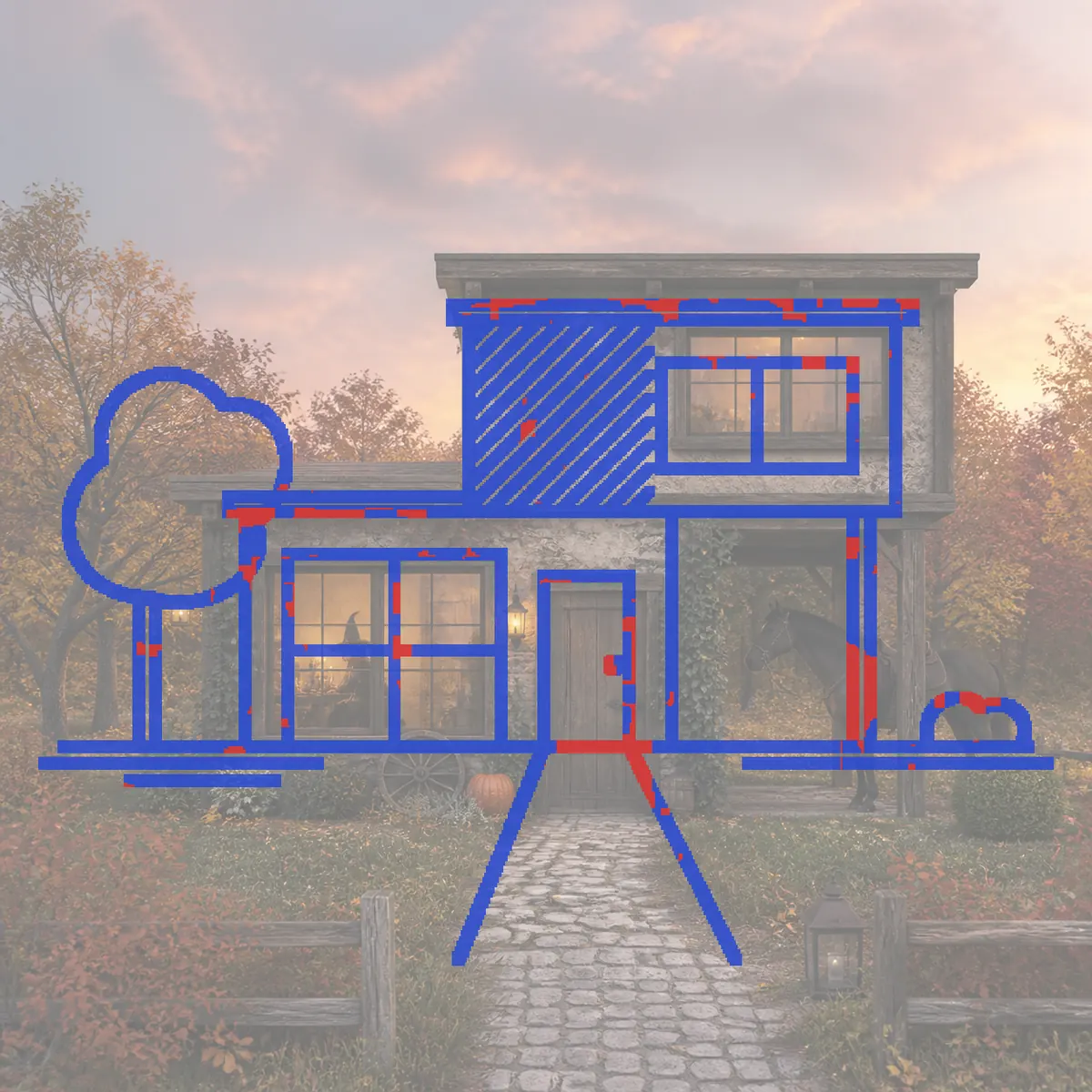
The line check scored it 89%, with no warning. Massing, openings and roofline are blue: the door, both windows and the post sit on the drawn lines although every material changed. The red comes in short segments at the top roof edge, the right-hand post and the threshold, now cobbles.
One caution the other way: the hatched block is blue this time, because rough plaster and ivy make plenty of small edges that happen to land on the hatching. Another reason to read the overlay, not only the number. The cottage also gained a fence, lanterns and a cart wheel the drawing never had.
Two very different prompts, and the shapes and proportions stayed put both times. The style is in the words; the design is in the lines.
Change just this: a red oak front door
Suppose the night version is right except the door, which you want in red oak. A new render would change everything. "Change just this" changes one part of the version in front of you. We made this edit on a second night render of the same sketch with the same description (no two renders are identical, which is exactly why you edit instead of rendering again).
- Open the version and choose Change just this.
- Drag over the door. Loose marks are fine; cover the door and a little around it.
- Say what it becomes. We typed
red oak front door; the "Red front door" idea is a click away. - Apply. It costs 5 credits, like a render.
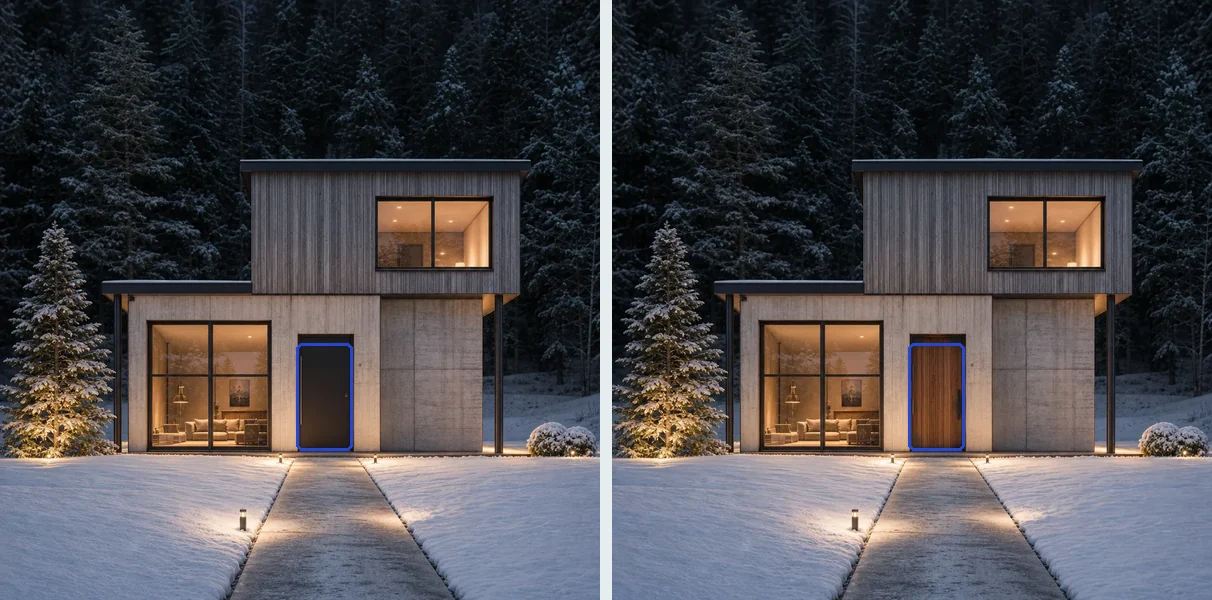
Only the area around your marks is redrawn; the rest is copied back from the version you started with, so the snow, windows and cladding stay as they were. If the change adds something, it is drawn whole even where it runs past your marks. On the red-door version we made one short mark on the lawn right of the path and typed a person grilling:
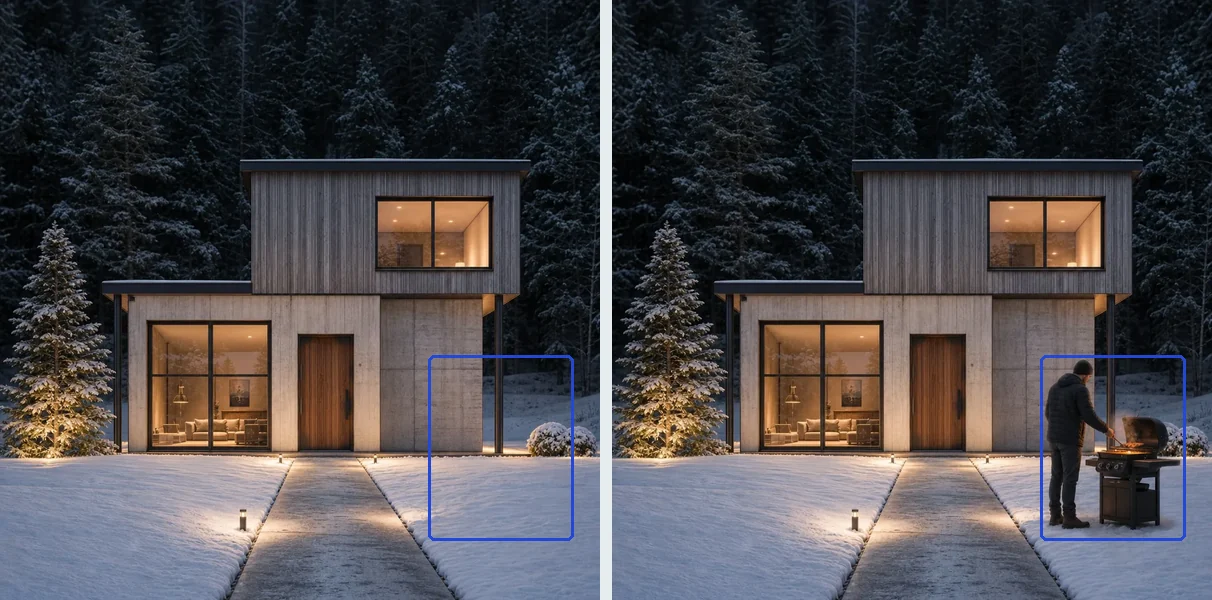
Each result is a new version; the ones with the original door and the empty lawn stay in your history. The brush section of the tutorial walks through it.
Download, and what the free version looks like
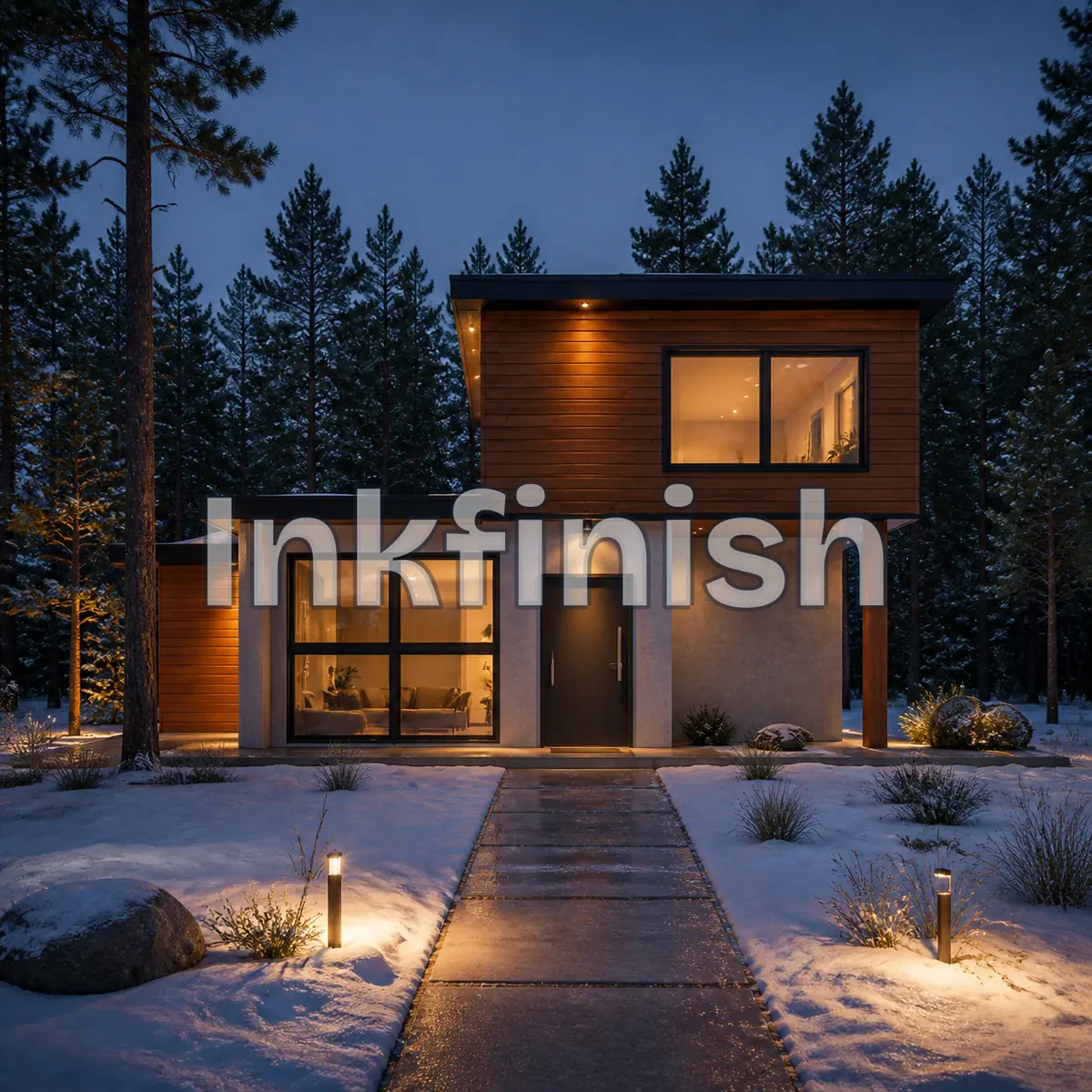
This is the night render as a free account sees it, with the Inkfinish wordmark across the middle. Sign in with a Google account and your first 3 renders are free. Free renders carry a watermark. You can download the render or email the full-size image to yourself. Everything in this post, two renders and one door edit, comes to three actions at 5 credits each, which fits inside the free allowance.
Paid plans remove the watermark: Standard is $15 a month for 800 credits (160 renders), Pro is $45 a month for 3,000 credits (600 renders), prices in USD before tax, cancel any time. Failed renders are refunded. Details are on the pricing page.
Limits
- The line check counts lost lines, not added things. The cedar wing, fence and lanterns do not register. Look at the render too.
- Materials and plants are approximate. "Cedar cladding" gives something that reads as cedar, not a specified product.
- Conflicting words get resolved for you, not necessarily the way you meant.
- It renders a view, not a building. No plans, sections, construction detail or 3D model.
- Faint or very busy sketches hold less well. Dark, clean lines give both render and line check more to work with.
- Results vary. The same sketch and prompt run twice will usually give two different images, and about 30 seconds is a typical time, not a promise.
One sketch, two descriptions, two very different houses, and the same openings, roofline and massing in both, with a score and an overlay to show it. The sample house is in the studio, and there is room for yours: try it on your own sketch.