How to Write a Render Prompt: Materials and Light
By Inkfinish · · 9 min read
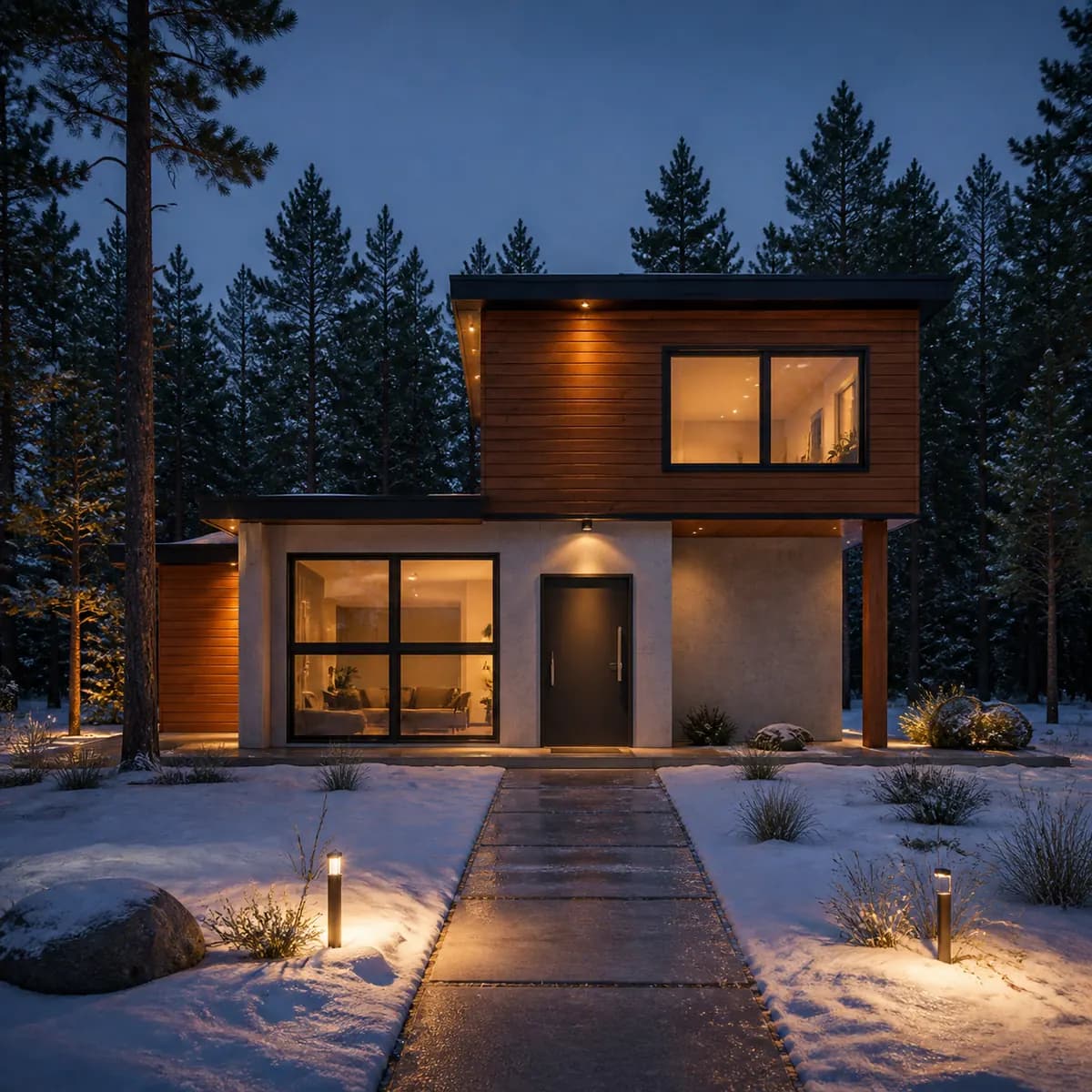
Most AI rendering prompts you find online are long strings of adjectives, written for tools that invent the whole picture. When the render starts from your own sketch, you need fewer words and different ones. The drawing already says what the thing is; the prompt only has to say what it is made of, how it is lit, and what surrounds it. Whether you write prompts for architectural rendering or for a chair, this guide covers what to write, what to leave out, a copy-paste table for each subject in Inkfinish, and what our real prompts taught us, including one that contradicted itself.
The four things to say: materials, light, setting, mood
A useful description answers four questions, roughly in this order of importance.
Materials. What are the surfaces made of? Name them as you would on a finish schedule: "cedar cladding", "pale concrete", "oak floor", "linen sofa", "tan leather seat". One material plus one qualifier (pale, brushed, oiled, matte) is usually enough. A sketch is silent on materials, and they do the most to make a render read as your project.
Light. Time of day, weather, and where the light comes from: "late afternoon sun", "soft morning light", "overcast", "night, lights on inside", "studio lighting".
Setting. What fills the parts of the frame your drawing left empty: "pine forest behind", "white studio backdrop", "dark polished floor".
Mood. Optional, one or two words: "warm", "quiet", "lived in", a season, a theme. "Warm Scandinavian living room" sets mood and style at once.
A complete description can be a single line. Here is the chair sample from the studio, ten words long:
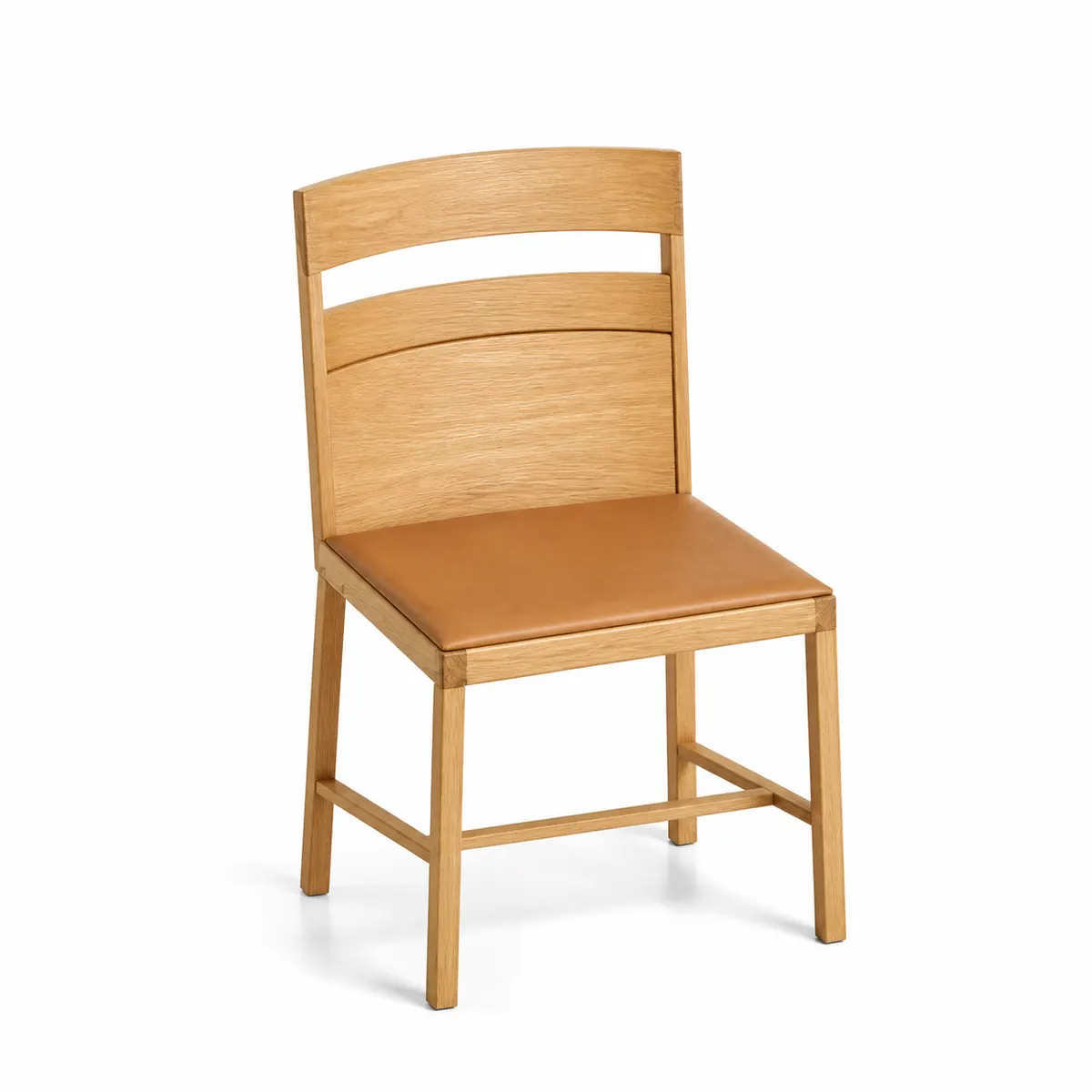
Two materials and a setting. The soft light and the shadow under the chair were not in the prompt; they are habits of the Product subject, which is the next thing to know.
AI rendering prompts by subject: a copy-paste table
Every render is made as one of five subjects: Building exterior, Interior, Product, Vehicle or Landscape. Leave the subject on "Choose for me" and the studio picks one from your image or your description. Each subject brings its own light and camera habits, so you do not need to type them:
| Subject | What it already does |
|---|---|
| Building exterior | Straight verticals, as with a shift lens; believable materials with some weathering; reflections in glass; planting and paving; soft, directional daylight |
| Interior | Eye level, level horizon; window daylight mixed with warm lamps; visible grain, weave and veining; lived in, without clutter |
| Product | Seamless backdrop; large soft key light and a contact shadow; crisp edges; no competing props |
| Vehicle | Long, clean reflections in the paint; precise panel gaps, wheels and glass; a faintly reflective floor. The sketch's camera angle comes first: our side-view car sketch rendered as a side view |
| Landscape | Soft morning or late-afternoon light; plants that suit one climate, layered by height; paths and edges that read as built |
So skip "photorealistic, shift lens, soft shadows". Spend words on what the subject cannot guess: your materials, and your light if it differs.
Below are three prompts per subject. "Rendered" marks the real descriptions behind renders on this blog. The rest are starting points written for this table, not tested results: copy one, swap in your own materials, and render.
| Subject | Prompt | Status |
|---|---|---|
| Building exterior | Cedar cladding and pale concrete, large glass, late afternoon sun, pine forest behind |
Rendered (house sample) |
| Building exterior | White lime render, charcoal standing-seam roof, oak window frames, overcast, soft light, meadow around |
Starting point |
| Building exterior | Dark brick, bronze window frames, night, lights on inside, wet street |
Starting point |
| Interior | Warm Scandinavian living room, oak floor, linen sofa, soft morning light |
Rendered (room sample) |
| Interior | Polished concrete floor, walnut cabinets, white marble worktop, warm lamps at dusk |
Starting point |
| Interior | Terracotta tile floor, limewashed walls, rattan armchair, overcast daylight, lived in |
Starting point |
| Product | Oak frame with a tan leather seat, white studio backdrop |
Rendered (chair sample) |
| Product | Matte black powder-coated steel, walnut top, warm gray backdrop |
Starting point |
| Product | Brushed aluminum body, frosted glass shade, white studio backdrop |
Starting point |
| Vehicle | Deep metallic blue paint, studio lighting, dark polished floor |
Rendered (car sample, two idea chips added) |
| Vehicle | Gloss red paint, black rims, tinted windows, wet asphalt at night, city lights |
Starting point |
| Vehicle | Pale sage matte paint, cream leather, coastal road, golden hour light |
Starting point |
| Landscape | Gravel path, low stone wall, lavender and grasses, soft morning light |
Starting point |
| Landscape | Timber deck, raised oak planters, kitchen garden, overcast, soft light |
Starting point |
| Landscape | Wildflower meadow, mown path, mature oak tree, late afternoon sun |
Starting point |
What not to write
Shapes. "A two-story house with a flat roof and a cantilevered upper floor" is already in your drawing. The studio tells the image model to keep the sketch's geometry, proportions, layout and camera angle and to change only materials, light, surroundings and finish. Shape words add nothing, and ones that disagree with the drawing only pull against it.
Two answers to one question. Two times of day, two floor materials. The model will pick one, and not always yours. There is a real example below.
Filler. "Masterpiece, ultra detailed, 8k, award-winning" says nothing about your materials or your light.
The one exception: when the input has no materials at all, name every one. A white 3D-model screenshot gives geometry and nothing else, so the description carries the whole finish; rendering a 3D model screenshot covers that case.
Time of day and weather: the words that change the most
Four of the six idea chips under the home page's description box are light or weather: "Golden hour light", "Overcast, soft light", "Night, lights on inside" and "Snow on the ground". Clicking a chip adds its phrase to the end of your description. That is handy, and it is how our house sample ended up asking for two times of day at once:
Cedar cladding and pale concrete, large glass, late afternoon sun, pine forest behind, night, lights on inside, snow on the ground
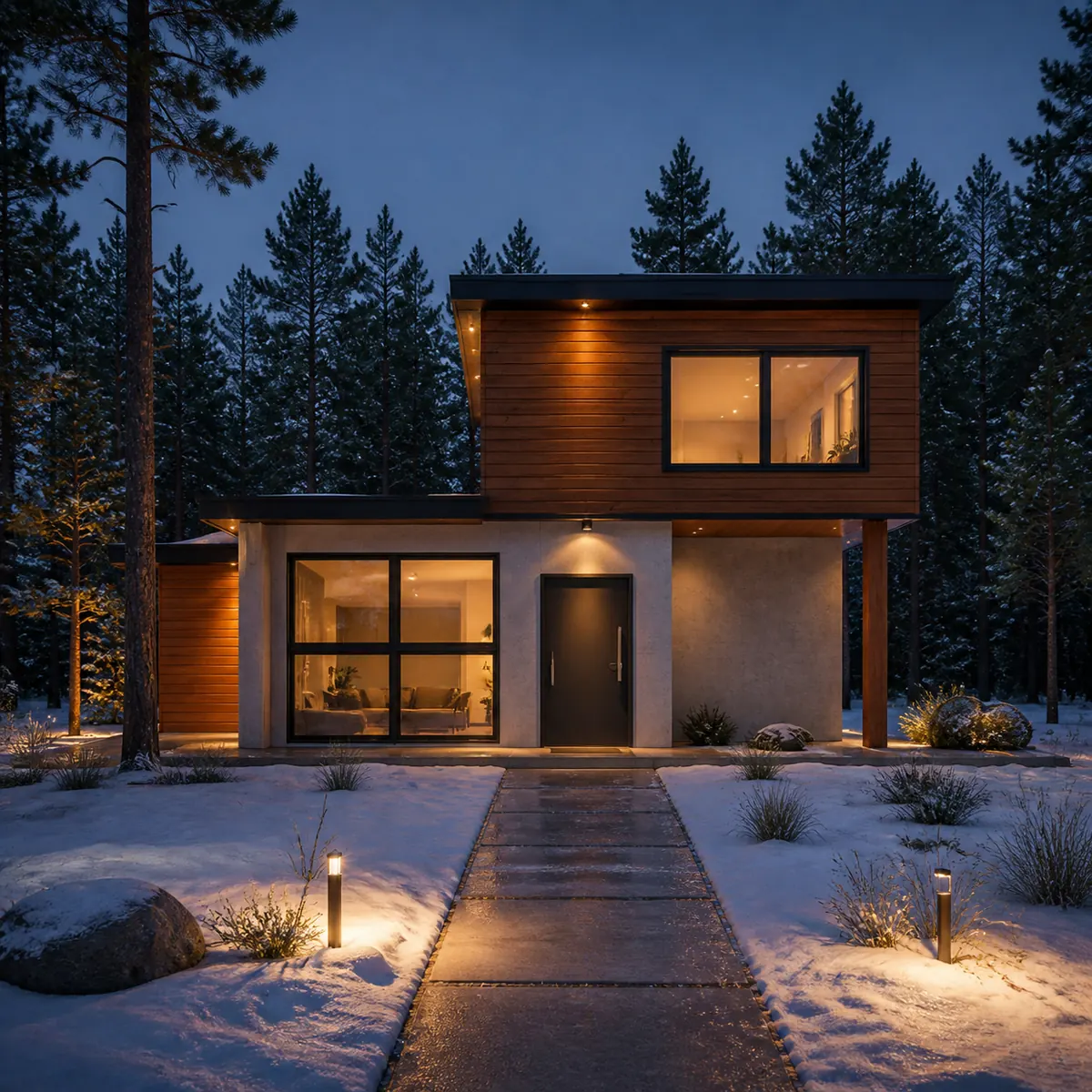
"Late afternoon sun" came from the sample, "night, lights on inside" from a chip, and the model chose night, not us. After clicking a chip, read the whole description and delete what it now contradicts. The house sketch walkthrough follows this render from sketch to download.
Chips also show where words go when the subject has nowhere to put them. The car sample was rendered with two chips added:
Deep metallic blue paint, studio lighting, dark polished floor, snow on the ground, oak and concrete

A car has no oak or concrete on it, so both went into the background: a concrete wall on the left, vertical oak slats on the right, and snow at the edges of the floor. If a material is meant for the object, attach it to a part: "walnut dashboard", not "walnut".
A short vocabulary of lighting prompts for renders:
| You want | Write |
|---|---|
| Low sun, long warm shadows | golden hour light or late afternoon sun |
| Even light, no hard shadows, true material color | overcast, soft light |
| A lit facade, glowing windows | night, lights on inside |
| A colored sky, lamps just coming on | dusk |
| Cool, fresh interior daylight | soft morning light |
| A catalog shot | white studio backdrop or studio lighting |
After light, weather and season change the most: snow covers ground and ledges, and "fall foliage" recolors every tree.
Short prompts, busy prompts
We have not yet rendered one sketch at three prompt lengths side by side, so here is what the real renders show.
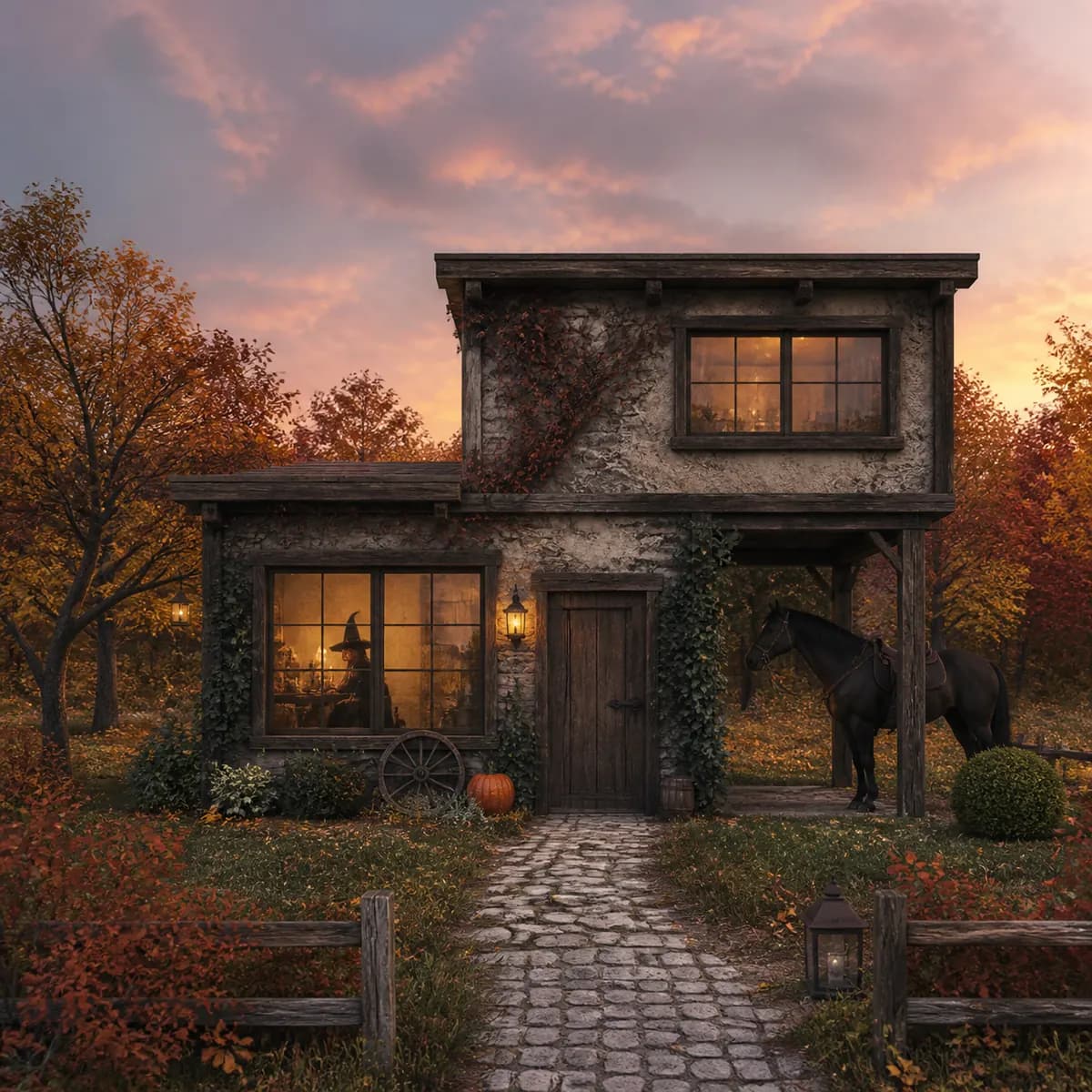
The house sample was also rendered with this:
Medieval, cottage, with fall foliage in the background. With a horse. Also a pumpkin. With a cute witch inside. Dusk.
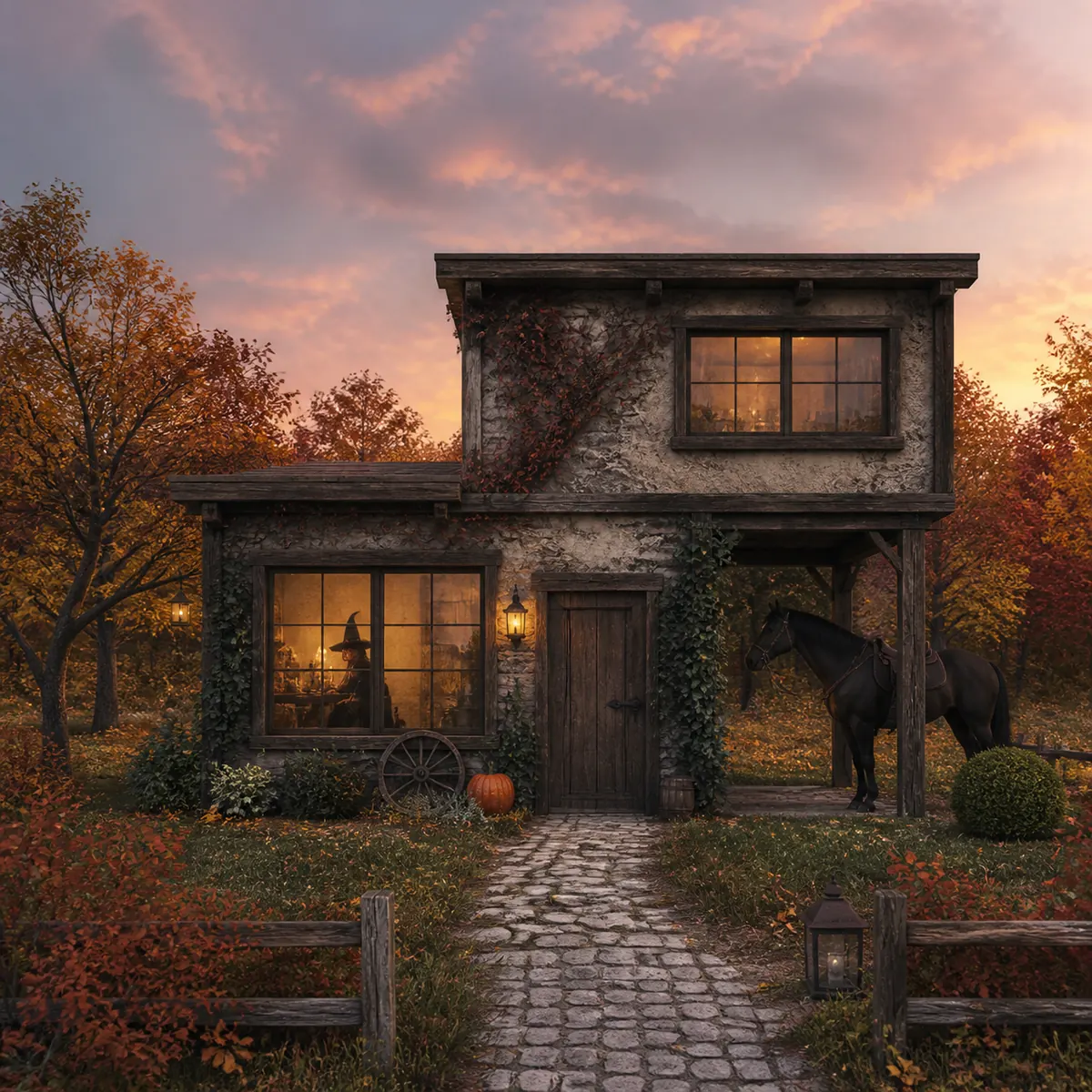
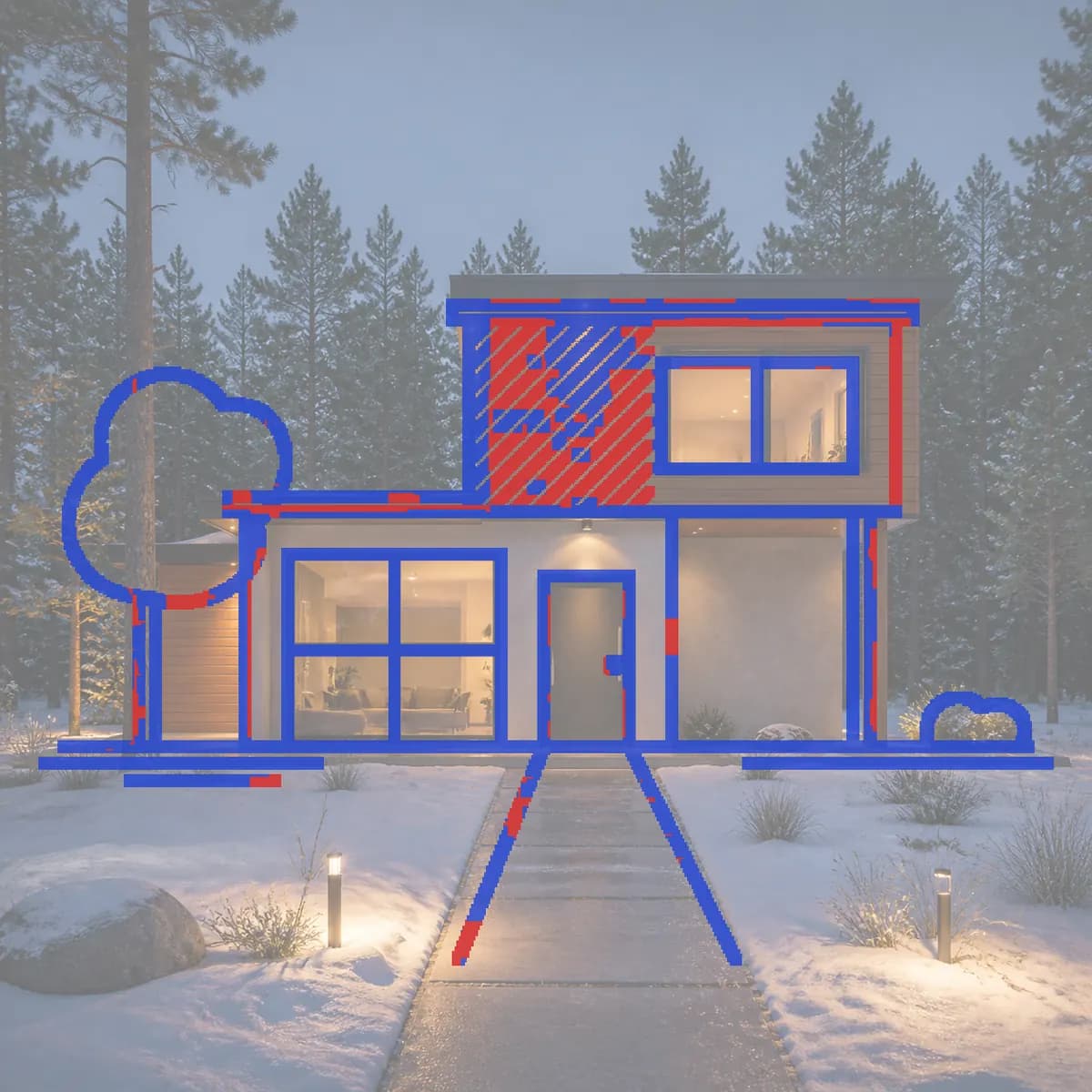
It is not long in words (twenty, like the night prompt), but it is the busiest we have run: a new style, a season, a time of day and three added things. It still kept the lines: 89%, with massing, openings and roofline intact, and the horse placed in the drawing's one open bay. Two renders are not a study, and the scores differ mostly for reasons unrelated to length (the night version lost its hatching to cedar boards). What they show is that the lines come from the sketch. A playful prompt changes the finish, not the building.
The room sample makes the point from the other side. Adding "Halloween theme." to its description kept the arrangement of the room and much the same score (61% before, 62% after), but the theme reached further than decoration:
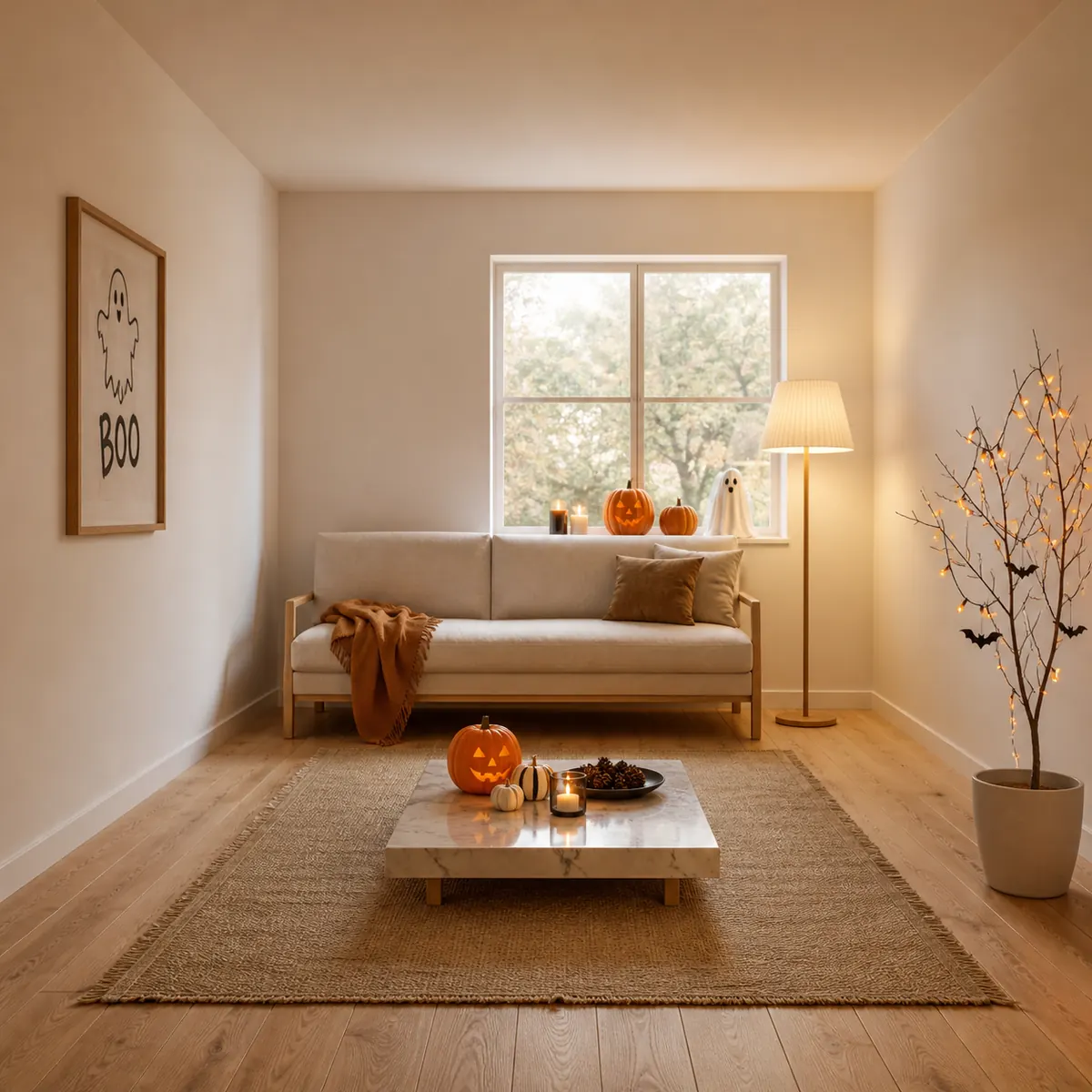
Pumpkins and a ghost print arrived, as asked. The coffee table also turned to marble and the plant became a branch tree hung with lights. A theme word restyles whatever it can reach; for one change only, use the brush, below. (Interior scores run lower because a room sketch has perspective and construction lines a finished room does not draw; the interior post explains how to read them.)
The practical method: start short, with materials and one light phrase. Then send one idea at a time as a follow-up message in the same design, so you can see which word did what. Each render costs 5 credits, every version is kept, and failed renders are refunded.
Prompts for "Change just this"
Brush edits want the opposite of a render prompt: short, and mostly nouns. Your marks say where; the words only say what. The brush panel offers one-click ideas per subject:
| Subject | One-click ideas |
|---|---|
| Building exterior | Red front door · Stone cladding · Add a tree here · Remove this |
| Interior | Oak flooring · Linen curtains · Add a plant here · Remove this |
| Product | Matte black finish · Brushed steel · Walnut wood · Remove this |
| Vehicle | Gloss red paint · Black rims · Tinted windows · Remove this |
| Landscape | Wildflowers here · Gravel path · Add a tree here · Remove this |
Add one qualifier at most; the field's own example, "A red oak front door with brass handles", is about the right length. Do not describe the rest of the image or repeat the light; the edit is told to match its surroundings. Anything you add, a person or a planter, is drawn whole even past your marks, so mark where it should stand rather than tracing an outline. A brush edit costs 5 credits, like a render. The tutorial's brush section shows the flow.
Limits
- Words steer; they do not specify. "Cedar" gives a convincing cedar, not a particular product, and plant species are approximate.
- Conflicting words get resolved without asking you.
- Setting words add things you did not draw, such as fences or lanterns. The line check catches lost lines, not additions; Does AI rendering keep your design? explains why.
- A prompt cannot repair a sketch. If a line is faint or missing, redraw it or use the brush.
- Results vary. The same prompt run twice will usually give two different images.
- The starting-point prompts above are untested until you render them.
A good render prompt is short, concrete and about the finish: materials, one light, a setting, maybe a mood. For the whole process, see the guide to sketch to render with AI, or the guide for architecture students if you are still building the vocabulary. Then pick a line from the table, swap in your materials, and paste a prompt into the studio.