3MF vs STL: Which File to Use for 3D Printing
By Inkfinish · · 4 min read
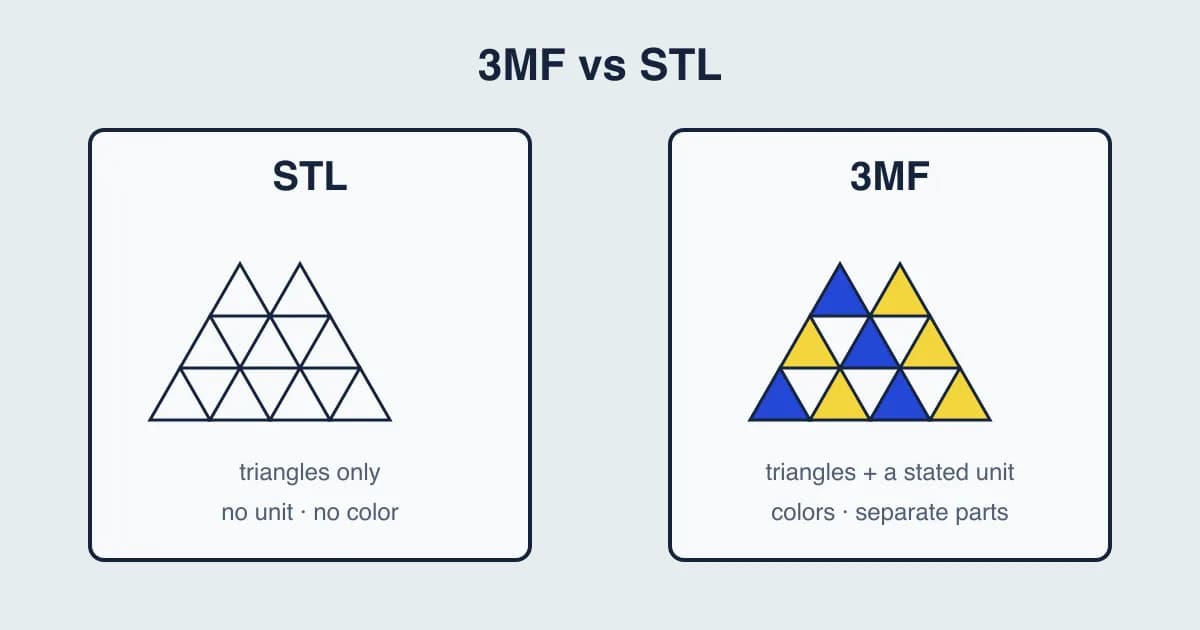
STL and 3MF are the two formats slicers read most. STL is the old, plain one: a list of triangles and nothing else. 3MF is the newer one: it states its unit and can hold colors and several parts in one file. Both print the same shape.
So for 3MF vs STL: use 3MF when your slicer and the people you share with can read it, and STL when you need a file that opens absolutely everywhere.
What an STL file holds
An STL stores a model as triangles. That is all:
- No unit. The numbers have no unit attached. Slicers read them as millimeters by convention, which is why a model exported in inches can arrive 25.4 times too small.
- No color. The model is one plain shape.
- No parts or settings. A model with several pieces is saved as one bundle of triangles.
Every slicer, CAD tool and model site reads STL, which is why it has lasted. Thingiverse and Printables still list most models as STL.
What a 3MF file holds
A 3MF is a zip file from the 3MF Consortium, with the model stored inside as XML. Compared with STL:
- It states its unit, so the model opens at the size it was made.
- It can hold colors, per part or per face.
- It can hold several parts, each kept as its own object.
- Slicers can store settings in it. PrusaSlicer, Cura, Bambu Studio and OrcaSlicer save whole build plates, with print settings, as 3MF projects.
That last point is a common source of confusion. A 3MF from a slicer can be a whole project, not just a model.
3MF vs STL at a glance
| STL | 3MF | |
|---|---|---|
| Shape | Triangles | Triangles |
| Unit | None (read as millimeters) | Stated in the file |
| Colors | No | Yes |
| Several parts | Merged into one | Kept as separate objects |
| Print settings | No | Slicers can store them |
| Opens in | Every slicer and CAD tool | Current slicers and many CAD tools |
When to use STL
- Sharing a model publicly where you do not know what software people use.
- Sending to a print service that asks for STL.
- Older software that does not read 3MF.
When to use 3MF
- Keeping the size right. The unit travels with the file.
- Multi-color prints. The colors per part come with the model.
- Several parts on one plate. Each stays its own object.
- Saving your own slicer project to come back to later.
How to convert 3MF to STL
The free 3MF to STL converter works in your browser, with nothing uploaded. If the 3MF holds a whole build plate, every part on it is read and converted. The STL is written in millimeters with Z pointing up, which is what slicers expect. Two things are left behind, because STL cannot hold them:
- Colors. STL has none.
- Separate parts. A model with several parts is saved as one STL file.
Print settings stored in the 3MF are ignored; only the shapes are read.
How to convert STL to 3MF
The free STL to 3MF converter writes a 3MF in millimeters with Z pointing up, so the unit is stated in the file from then on. STL has no unit of its own, and slicers read it as millimeters, so that is the starting choice. If your model was made in inches, choose inches before you convert, and the size will come out right.
Check the model before you print
The free STL viewer and 3MF viewer open a file in your browser without a slicer. Check the size shown: a part that is 1000 times too big or too small usually means the unit was wrong.
Neither converter repairs holes or flipped faces. A model that was broken when it was exported is still broken after, so run your slicer's repair tool before you print.
Got a GLB or OBJ from a model site instead? The GLB to STL converter turns it into a printable STL.
Questions people ask
Is 3MF better than STL?
For your own prints, often yes: it keeps the unit, colors and separate parts. STL is still the safest choice when you share a model with people whose software you do not know.
Why is my STL the wrong size?
STL has no unit. Slicers read it as millimeters, so a model exported in inches or meters arrives at the wrong scale. Scale it in the slicer, or export it again in millimeters.
Can I convert a Bambu Studio 3MF to STL?
Yes. The 3MF to STL converter reads the parts on the plate and ignores the print settings. The STL keeps the shapes only.
Does converting STL to 3MF improve print quality?
No. The triangles are the same, so the print is the same shape. What you gain is a stated unit, and a file you can add colors and settings to in your slicer.
Are my files uploaded anywhere?
No. The viewers and converters run in your browser, on your own device.
Have a file to check? Open it in the STL viewer before you slice.