GLB vs glTF: Which to Use and How to Convert
By Inkfinish · · 5 min read
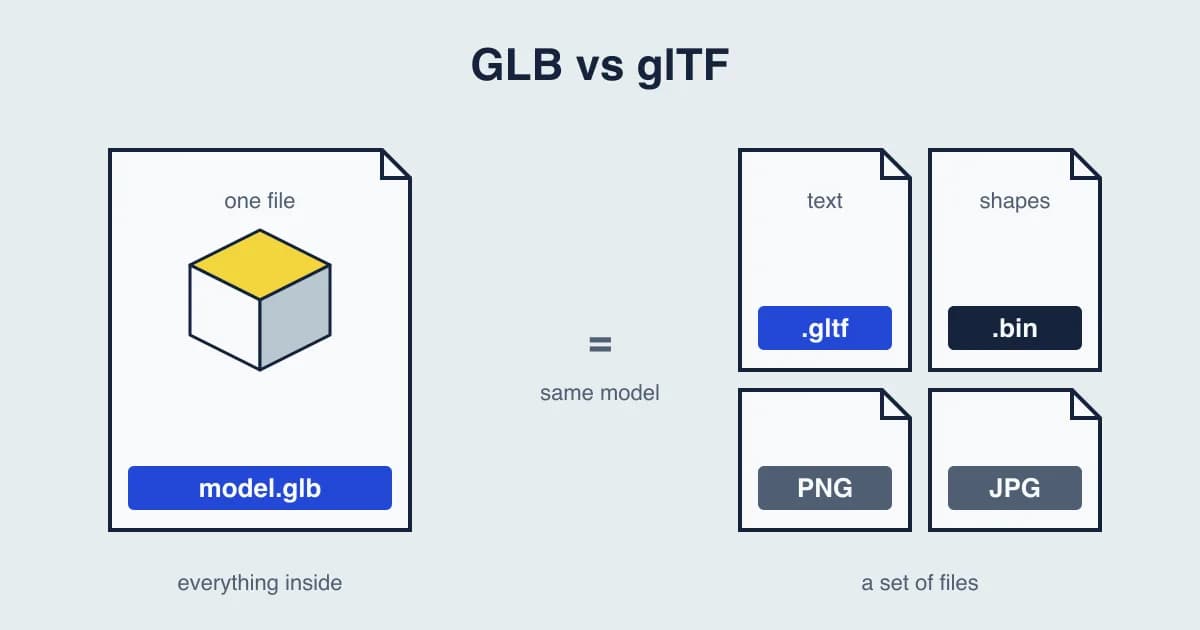
GLB and glTF are the same 3D format in two packages. Both are glTF 2.0, kept by the Khronos Group, and both can hold a model's shapes, materials, textures and animation. The difference is how the files are stored: a GLB is one binary file with everything inside, and a .gltf is a text file that usually points to other files beside it.
So the short answer to GLB vs glTF: send a GLB, and keep a .gltf only when you want to read or edit the file by hand.
What a .gltf file is
A .gltf file is text, written as JSON. It describes the scene: which meshes there are, where they sit, what materials they use and which animations play. The heavy parts usually live elsewhere:
- A .bin file holds the shapes: the points, triangles and other numbers.
- Image files, often PNG or JPEG, hold the textures.
So one model is usually a small set of files, and the .gltf names each of the others. If one goes missing or is renamed, the model opens without it: gray where a texture should be, or not at all.
There is also an "embedded" kind of .gltf that stores the .bin and the images inside the text. It is a single file, but larger than a GLB of the same model, because binary data written as text takes more room.
What a GLB file is
A GLB is the binary form of glTF. The same scene description, the shapes and the textures are packed into one file. Nothing can go missing, and the file is compact and quick to load.
That is why GLB is the usual choice on the web, for AR on Android, in game engines and in most 3D viewers. When a site asks you to "upload a glTF model", it almost always accepts a GLB.
GLB vs glTF at a glance
| GLB | glTF | |
|---|---|---|
| Files | One binary file | A .gltf, usually with a .bin and images |
| Readable in a text editor | No | Yes |
| Can lose a texture in transit | No | Yes, if a file is left behind |
| Size | Compact | Larger when embedded; same total when separate |
| Contents | Shapes, materials, textures, animation | The same |
| Units | Meters | Meters |
When to use GLB
- Sending a model to someone. One file to attach, nothing to forget.
- Web pages, AR and game engines. It is what they expect.
- Online viewers and libraries. Most take GLB first.
When to keep glTF
- Editing by hand. You can open the .gltf in a text editor and change a material value or a node name.
- Swapping textures. With separate image files you can replace a texture without exporting the model again.
- Version control. Text files show readable changes, which helps when a team tracks a model in Git.
How to convert glTF to GLB
The free glTF to GLB converter packs a .gltf, its .bin and its images into one GLB in your browser. Nothing is uploaded.
- Choose the .gltf and every file that goes with it in one go: the .bin and the pictures. Hold Ctrl or Shift to pick several, or drag them in together.
- Keep the file names as the .gltf names them. A renamed file cannot be found.
- Convert, and download the GLB.
From Blender, you can also export a GLB directly: File, Export, glTF 2.0, with the format set to glTF Binary.
How to open a GLB file
The free GLB viewer opens a GLB in your browser, with no upload and nothing to install. It shows the model with its textures and lets you turn it around and check its size before you send it on. The 3D model viewer opens a .gltf too, when everything is embedded in that one file; for a .gltf with a separate .bin and images, convert it to GLB first.
If a GLB looks gray, its pictures may have been left out when it was exported. Export it again with the textures embedded. If it uses KTX2 textures, export it again without that option; the viewer reads Draco and Meshopt compression, but not KTX2.
GLB for iPhone AR
iPhones and iPads use a different format, USDZ, for AR Quick Look. The free GLB to USDZ converter makes one from a GLB in your browser.
Questions people ask
Is GLB better than glTF?
For sending and loading, usually yes: it is one compact file and nothing can go missing. For editing by hand, glTF's text form is easier. The model inside is the same.
Does converting glTF to GLB lose anything?
No. A GLB holds the same shapes, materials, textures and animation as the glTF. The converter packs them into one file; it does not simplify the model.
Can I open a GLB file in a text editor?
Not usefully. A GLB is binary. To read the scene as text, keep or convert it to .gltf.
What units do GLB and glTF use?
Meters, always. The format fixes it, so a model sized in meters opens at the right size in any app that reads glTF correctly.
Can I 3D print a GLB?
Slicers want STL or 3MF. The GLB to STL converter writes an STL in millimeters with Z pointing up, which is what slicers expect. Check the size in your slicer before you print.
Have a model to send? Open it in the GLB viewer first, so you know it looks right.